Spatial design • concept 2025
Smart Mirror
A new way to scan your health
Product Designer & Solution Architect
2 Product Designers & 2 Product Mangers
Before you read further, it’s important to note:
This is a 0→1 product a completely novel solution with no direct precedent in India or globally. It reimagines how users interact with personal health data in physical spaces, bridging AI, design, and healthcare in a way that hasn’t been done before.
This is a 0→1 product a completely novel solution with no direct precedent in India or globally. It reimagines how users interact with personal health data in physical spaces, bridging AI, design, and healthcare in a way that hasn’t been done before.
Why a Smart Health Mirror
The smart health mirror is a digitally integrated device designed for passive, real-time tracking of critical health parameters. It captures a wide array of vitals including body weight, body composition (up to 12 metrics such as BMI, body fat %, muscle mass, and visceral fat), temperature, SpO₂, blood pressure, heart rate, and respiratory rate.
The smart health mirror is a digitally integrated device designed for passive, real-time tracking of critical health parameters. It captures a wide array of vitals including body weight, body composition (up to 12 metrics such as BMI, body fat %, muscle mass, and visceral fat), temperature, SpO₂, blood pressure, heart rate, and respiratory rate.
From a design perspective, the mirror integrates seamlessly into everyday environments, combining functionality with minimal visual intrusion. The interface is optimized for intuitive interaction, offering visual feedback, historical trends, and health alerts—all without requiring active input from the user. This passive yet comprehensive system enhances both preventive care and daily health awareness.
From a design perspective, the mirror integrates seamlessly into everyday environments, combining functionality with minimal visual intrusion. The interface is optimized for intuitive interaction, offering visual feedback, historical trends, and health alerts—all without requiring active input from the user. This passive yet comprehensive system enhances both preventive care and daily health awareness.
Traditional Health Screening Today
Health screening commonly requires scheduled appointments, personal effort to record vitals, and delayed access to results often leading to lower engagement, visibility, and sustained participation. Routine vitals such as blood pressure, body composition, and oxygen saturation remain hidden until formal health assessments are conducted.
Health screening commonly requires scheduled appointments, personal effort to record vitals, and delayed access to results often leading to lower engagement, visibility, and sustained participation. Routine vitals such as blood pressure, body composition, and oxygen saturation remain hidden until formal health assessments are conducted.
Low engagement with preventive health tools: People rarely self-monitor vitals without compelling, accessible touchpoints.
Low engagement with preventive health tools: People rarely self-monitor vitals without compelling, accessible touchpoints.
Fragmented experiences at health camps or workplaces: Multiple devices and manual entry reduce participation.
Fragmented experiences at health camps or workplaces: Multiple devices and manual entry reduce participation.
Lack of real-time feedback: Users do not see trends or immediate context for their health data.
Lack of real-time feedback: Users do not see trends or immediate context for their health data.
What we aim to achieve
This project aims to use strategically placed smart health mirrors as interactive kiosks to boost health engagement among Group Medical Cover (GMC) users and drive greater utilization of underused Bajaj Finserv Health services.
This project aims to use strategically placed smart health mirrors as interactive kiosks to boost health engagement among Group Medical Cover (GMC) users and drive greater utilization of underused Bajaj Finserv Health services.
Increase in Activation Rate for Targeted Underutilized Wellness Programs
Increase in Activation Rate for Targeted Underutilized Wellness Programs
Quarterly Active Smart Mirror Users
Quarterly Active Smart Mirror Users
Digital Health Profiles Enriched Annually (with new mirror data)
Digital Health Profiles Enriched Annually (with new mirror data)
The goal was to create a platform that brings back users
Designing enhancements for an existing EMR required navigating technical, behavioral, and philosophical constraints simultaneously
Designing enhancements for an existing EMR required navigating technical, behavioral, and philosophical constraints simultaneously
Designing Trust in a Non-Clinical Environment
Designing Trust in a Non-Clinical Environment
The mirror was placed in semi-public spaces such as offices and health camps, not hospitals. A key challenge was ensuring users trusted the accuracy and legitimacy of the readings despite the informal setting.
The interface had to visually communicate reliability without overwhelming users with medical jargon or disclaimers.
The mirror was placed in semi-public spaces such as offices and health camps, not hospitals. A key challenge was ensuring users trusted the accuracy and legitimacy of the readings despite the informal setting.
The interface had to visually communicate reliability without overwhelming users with medical jargon or disclaimers.
2. Making Health Data Instantly Understandable
2. Making Health Data Instantly Understandable
Users were exposed to multiple vitals at once — body composition, cardiovascular metrics, and oxygen levels. Presenting this information without causing confusion or anxiety was critical.
The challenge was to prioritize clarity over completeness, showing only what mattered most while still offering meaningful context through ranges and trends.
Users were exposed to multiple vitals at once — body composition, cardiovascular metrics, and oxygen levels. Presenting this information without causing confusion or anxiety was critical.
The challenge was to prioritize clarity over completeness, showing only what mattered most while still offering meaningful context through ranges and trends.
Designing for Repeated, Habitual Use
Designing for Repeated, Habitual Use
A single health snapshot has limited long-term value. The experience needed to encourage users to return without feeling repetitive or intrusive.
This required subtle design cues trends, comparisons, and progress indicators that reward repeat interactions without gamifying health irresponsibly.
A single health snapshot has limited long-term value. The experience needed to encourage users to return without feeling repetitive or intrusive.
This required subtle design cues trends, comparisons, and progress indicators that reward repeat interactions without gamifying health irresponsibly.
Integrating Hardware Constraints Into UX
Integrating Hardware Constraints Into UX
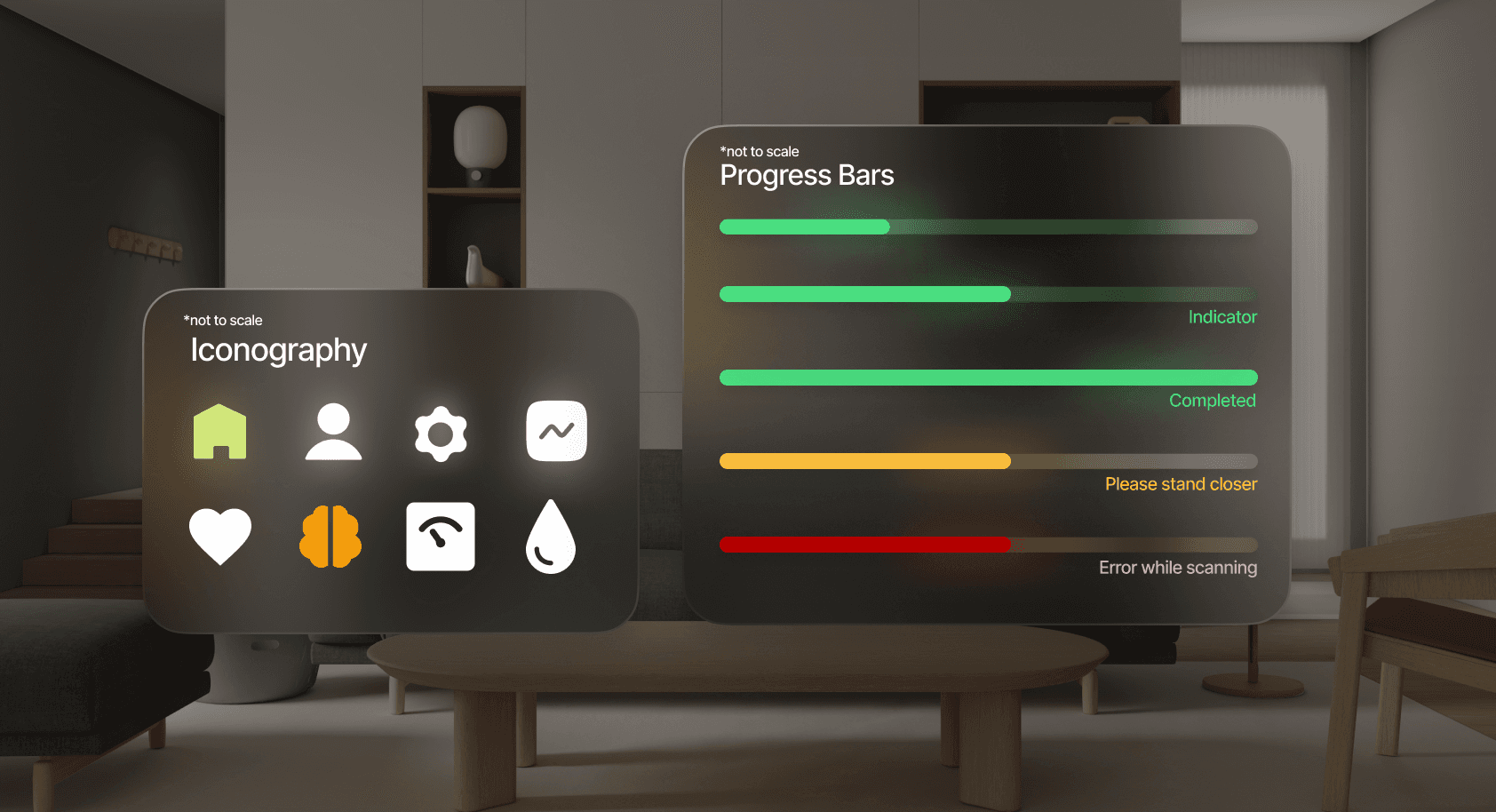
Sensor placement, lighting conditions, and physical posture directly affected readings. These constraints could not be exposed to the user as “errors.”
The challenge was to design around hardware limitations through UI guidance and feedback that felt natural rather than corrective.
Sensor placement, lighting conditions, and physical posture directly affected readings. These constraints could not be exposed to the user as “errors.”
The challenge was to design around hardware limitations through UI guidance and feedback that felt natural rather than corrective.
What are Smart Health Mirrors?
Smart health mirrors are ambient computing surfaces that combine mirrors with sensors, cameras, and AI to passively capture health data as part of daily routines. They evolved from early ambient computing experiments into health-focused tools enabled by IoT, computer vision, and embedded systems.
Smart health mirrors are ambient computing surfaces that combine mirrors with sensors, cameras, and AI to passively capture health data as part of daily routines. They evolved from early ambient computing experiments into health-focused tools enabled by IoT, computer vision, and embedded systems.
Current use in Healthcare
Contactless vital monitoring
Contactless vital monitoring
Assisted living and remote patient observation
Assisted living and remote patient observation
Fitness, posture, and lifestyle tracking
Fitness, posture, and lifestyle tracking
Why Smart Health Mirrors Matter
Smart health mirrors are emerging as a natural evolution in healthcare by embedding preventive, personalized health monitoring into everyday life. As healthcare shifts from reactive treatment to proactive care, there is growing demand for continuous, low-effort health insights and remote monitoring through telemedicine.
Unlike traditional health devices that require active engagement and dedicated time, smart mirrors integrate seamlessly into daily routines. They passively capture multiple health parameters, reduce monitoring fatigue, and enable consistent longitudinal tracking—bridging the gap between everyday behavior and clinical healthcare.
Smart health mirrors are emerging as a natural evolution in healthcare by embedding preventive, personalized health monitoring into everyday life. As healthcare shifts from reactive treatment to proactive care, there is growing demand for continuous, low-effort health insights and remote monitoring through telemedicine.
Unlike traditional health devices that require active engagement and dedicated time, smart mirrors integrate seamlessly into daily routines. They passively capture multiple health parameters, reduce monitoring fatigue, and enable consistent longitudinal tracking—bridging the gap between everyday behavior and clinical healthcare.
The approach focused on designing a health monitoring experience that felt effortless, trustworthy, and non-clinical while operating in public and semi-public environments.
Understanding the Target Audience
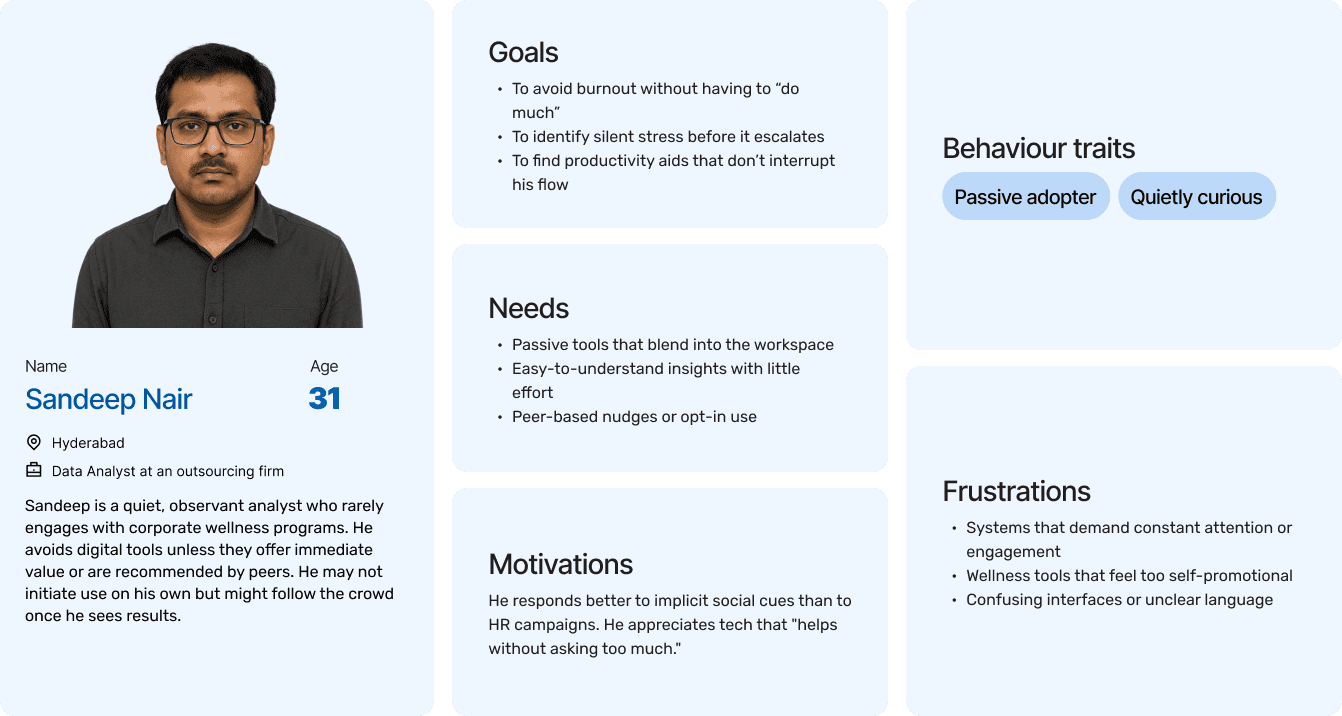
The process began with studying the intended users and usage environments to understand motivations, comfort levels with health data, and expectations from a non-clinical health interface. This helped identify key sensitivities around privacy, trust, and ease of use.
The process began with studying the intended users and usage environments to understand motivations, comfort levels with health data, and expectations from a non-clinical health interface. This helped identify key sensitivities around privacy, trust, and ease of use.
Defining Personas, Scenarios, and User Journeys
Based on early insights, user personas and realistic usage scenarios were defined to map how different users would encounter, interact with, and leave the mirror. These journeys helped clarify moments of confusion, hesitation, and opportunity across the experience.
Based on early insights, user personas and realistic usage scenarios were defined to map how different users would encounter, interact with, and leave the mirror. These journeys helped clarify moments of confusion, hesitation, and opportunity across the experience.
Ideation and Information Architecture
Multiple concepts were explored to determine what health information should be shown, in what order, and at what level of detail. A clear information architecture was created to prioritize essential vitals while keeping the interface uncluttered and easy to scan.
Prototyping Beyond Static Screens
Given the dynamic and ambient nature of the mirror, static wireframes were insufficient. AI-assisted prototyping was used to simulate real-time data changes, interactions, and feedback loops, enabling faster iteration and more realistic validation of the experience.
Given the dynamic and ambient nature of the mirror, static wireframes were insufficient. AI-assisted prototyping was used to simulate real-time data changes, interactions, and feedback loops, enabling faster iteration and more realistic validation of the experience.
Google AI Studio for rapid AI experimentation and POCs
Google AI Studio for rapid AI experimentation and POCs
Claude + Cursor to build and test a functioning prototype that reflected real EMR behavior
Claude + Cursor to build and test a functioning prototype that reflected real EMR behavior
Making a working prototype
We decided to use as many AI tools as we can to make a working prototype for the Smart Mirror to understand the users needs and what works best for them
We decided to use as many AI tools as we can to make a working prototype for the Smart Mirror to understand the users needs and what works best for them
Onboarding of the smart mirror
Results page and a detailed breakdown of the results
For the full flow you can use these links:
User Testing
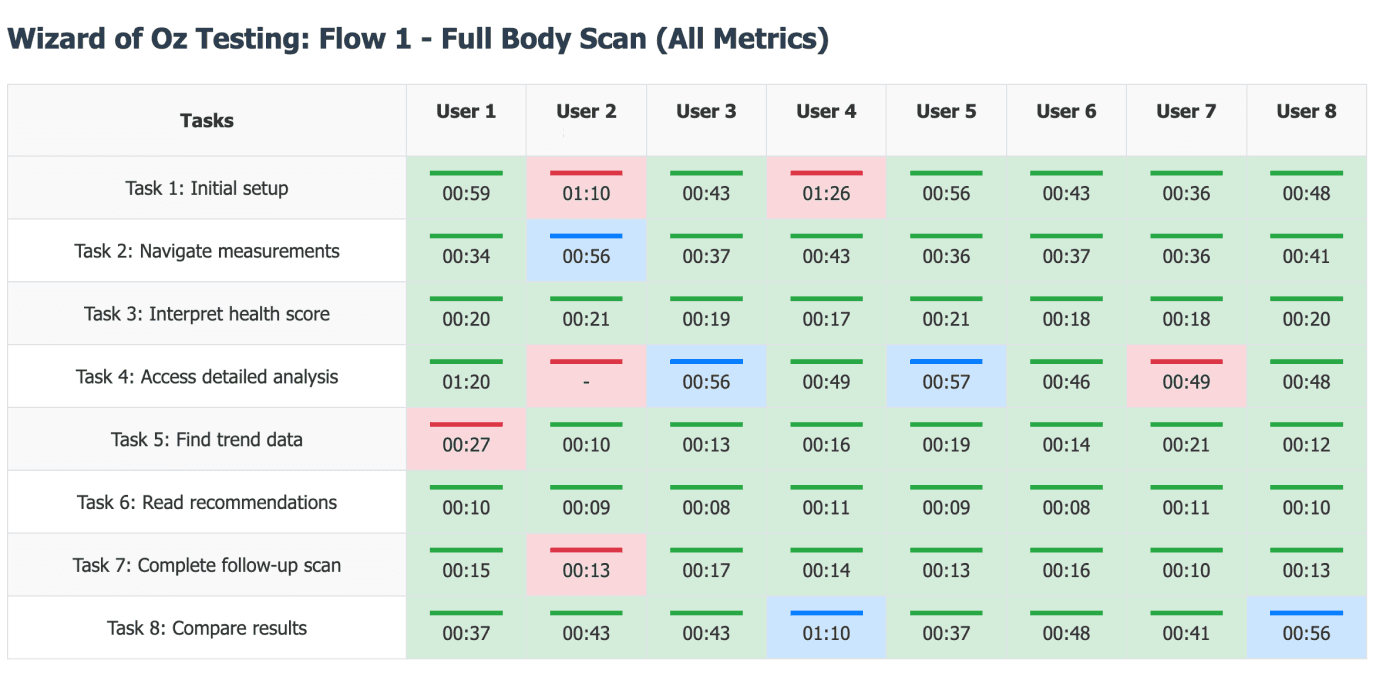
After two weeks of getting a proper working prototype, we used an old TV to simulate a working smart mirror and conducted a user test
After two weeks of getting a proper working prototype, we used an old TV to simulate a working smart mirror and conducted a user test
Key Takeaways
Flow 1: Full Body Scan – Summary Report View
Flow 1: Full Body Scan – Summary Report View
Combine the summary screen with layered interactions — show one insight at a time with swipe or voice gesture navigation.
Combine the summary screen with layered interactions — show one insight at a time with swipe or voice gesture navigation.
Flow 2: Skin Analysis Flow
Flow 2: Skin Analysis Flow
Add a personalized summary card right after the scan that gently transitions into full metrics (e.g., “Here’s what we found most urgent → Tap to see all metrics”).
Add a personalized summary card right after the scan that gently transitions into full metrics (e.g., “Here’s what we found most urgent → Tap to see all metrics”).
Flow 3: Full Body Scan – Individual Metric Cards View
Flow 3: Full Body Scan – Individual Metric Cards View
Introduce smart prioritization — highlight top 3 insights (e.g., Water %, Posture, Muscle Mass) with a “See All” option. Use contextual microcopy like “This changed most since your last scan.”
Introduce smart prioritization — highlight top 3 insights (e.g., Water %, Posture, Muscle Mass) with a “See All” option. Use contextual microcopy like “This changed most since your last scan.”
Layered UI works best: Start with a score or summary → allow user-led exploration.
Layered UI works best: Start with a score or summary → allow user-led exploration.
Remove friction in onboarding: Any delays (like glasses prompt or unclear auto-starts) break immersion.
Remove friction in onboarding: Any delays (like glasses prompt or unclear auto-starts) break immersion.
Prioritize, not dump: Whether it's 8 skin metrics or 12 body insights, highlight the most relevant 2–3 first.
Prioritize, not dump: Whether it's 8 skin metrics or 12 body insights, highlight the most relevant 2–3 first.
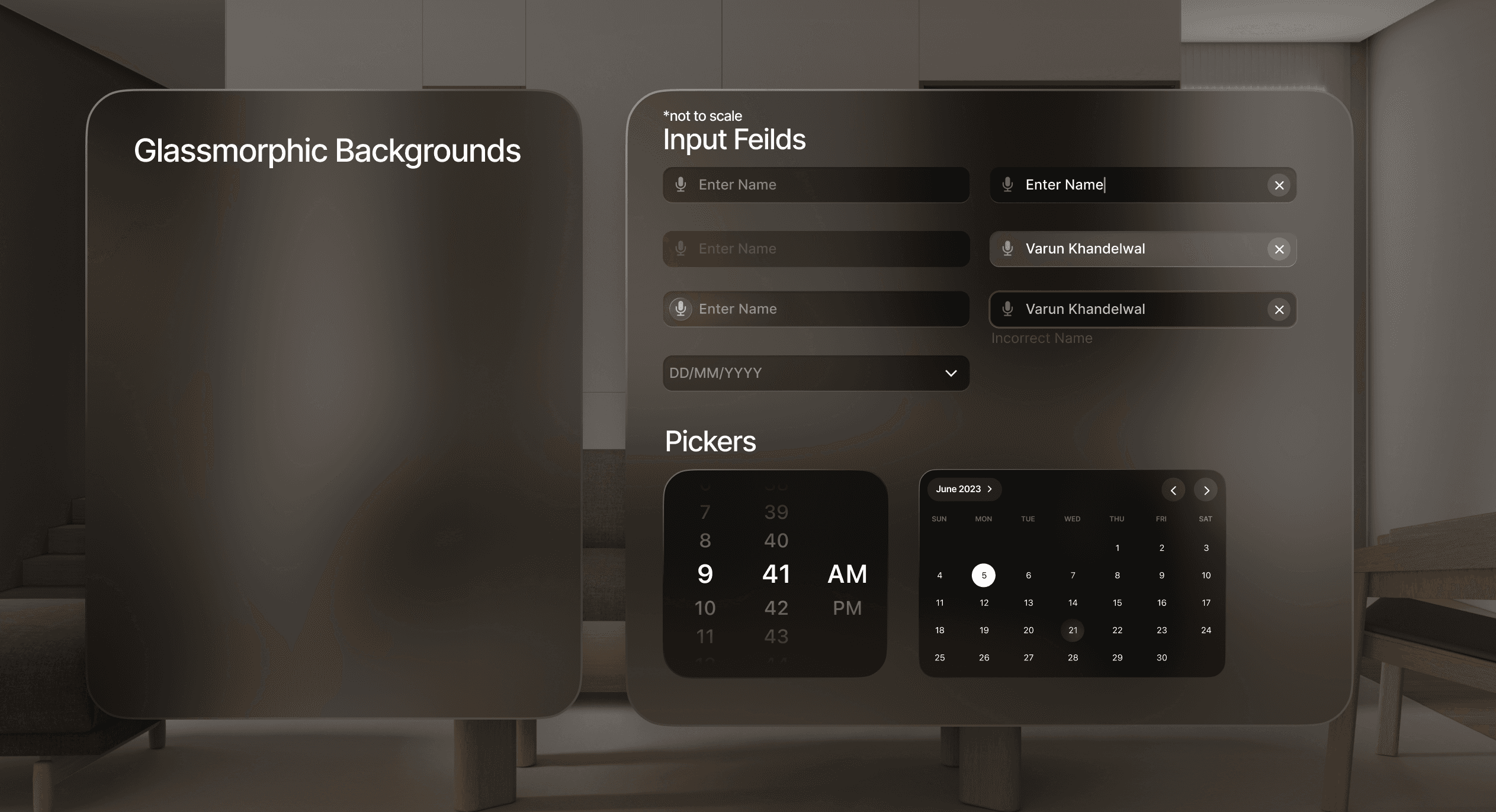
We were designing for a 3D space instead of a phone screen
We decided to use as many AI tools as we can to make a working prototype for the Smart Mirror to understand the users needs and what works best for them
We decided to use as many AI tools as we can to make a working prototype for the Smart Mirror to understand the users needs and what works best for them
Canvas size *not to scale
Final UI of the smart mirror
Understanding and establishing a design system, it was time to finally design the flow for the smart mirror
Understanding and establishing a design system, it was time to finally design the flow for the smart mirror
Scanning the height and weight of the user
Results and a Health Risk Assessment for a first time user
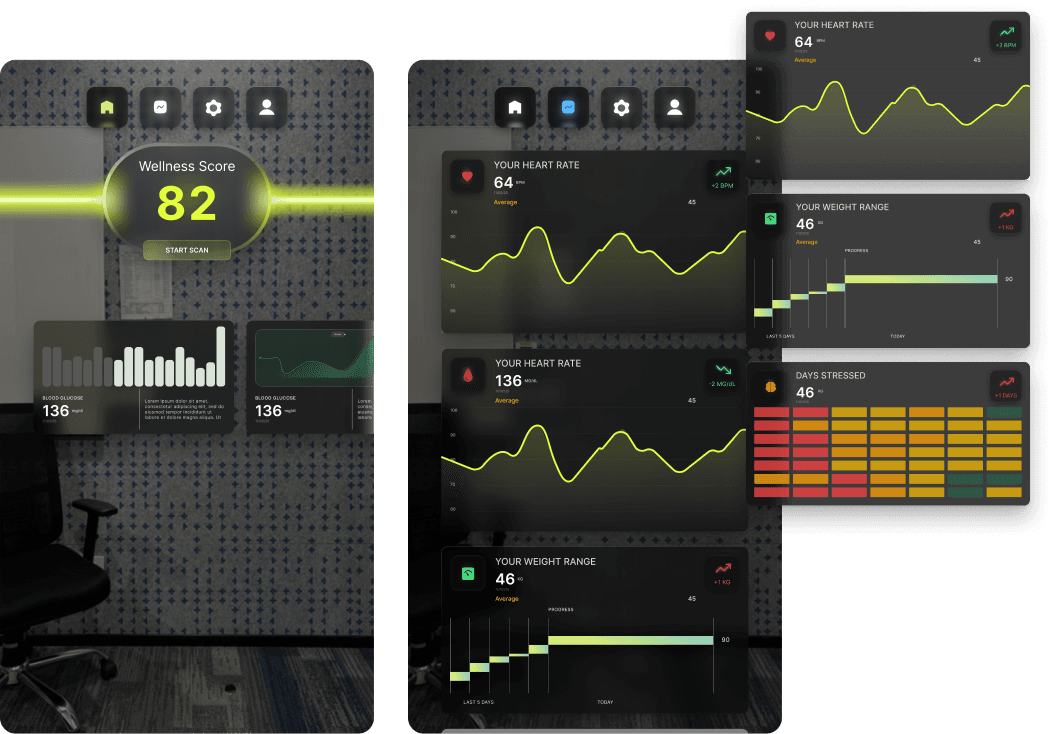
Dashboard and Data visualisations for trends
Full body scan animation and real time feedback
Snippets of the scanned results + report with the breakdown
Figma link for the designs:
From Internal Validation to Real-World Deployment
The smart health mirror is designed as a low-friction addition to the company’s wellness ecosystem, enabling employees to quickly check key health indicators and encouraging small, consistent behavior changes without disrupting daily routines. Over time, this can improve health awareness, support early risk detection, and contribute to a more engaged and productive workforce.
As an early-stage concept, the project faced practical constraints. Testing was conducted on a standard display rather than dedicated mirror hardware, limiting realism and real-time scanning validation. Despite these limitations, iterative prototyping and continuous feedback helped establish a strong proof of concept and a clear foundation for future refinement.
The smart health mirror is designed as a low-friction addition to the company’s wellness ecosystem, enabling employees to quickly check key health indicators and encouraging small, consistent behavior changes without disrupting daily routines. Over time, this can improve health awareness, support early risk detection, and contribute to a more engaged and productive workforce.
As an early-stage concept, the project faced practical constraints. Testing was conducted on a standard display rather than dedicated mirror hardware, limiting realism and real-time scanning validation. Despite these limitations, iterative prototyping and continuous feedback helped establish a strong proof of concept and a clear foundation for future refinement.
My first 0 - 1 project taught me a lot
Design in a Real-World Context:
Understood how design decisions are influenced by organizational priorities, business feasibility, and stakeholder expectations.
Understood how design decisions are influenced by organizational priorities, business feasibility, and stakeholder expectations.
Designing Without Final Hardware:
Learned to simulate and test experiences using proxy tools (like a TV display) when actual hardware (camera + mirror) wasn’t available, while still focusing on usability and experience fidelity.
Learned to simulate and test experiences using proxy tools (like a TV display) when actual hardware (camera + mirror) wasn’t available, while still focusing on usability and experience fidelity.
Interface Design for Ambient Displays:
Built for a unique modality where users engage with a non-handheld screen, learning to prioritize gestureless interactions, large type, and minimal touch.
Built for a unique modality where users engage with a non-handheld screen, learning to prioritize gestureless interactions, large type, and minimal touch.